
Executive Summary: Microsoft Copilot serves as the primary AI assistant across corporate enterprise environments, integrated natively into Windows, Edge, Word, Excel, Outlook, and Teams [¹]. Grounded in Bing’s web search index, Copilot synthesizes real-time web data to generate footnote-cited answers for enterprise buyers [¹]. Optimizing for Copilot requires claiming Bing Webmaster Tools, structuring procurement-stage technical content for machine extraction, and maintaining high first-party domain authority.
Key Takeaways
- Unrivaled Enterprise Scale: Microsoft 365 maintains hundreds of millions of commercial seats, with over 20 million paid enterprise Copilot licenses deployed across 90%+ of Fortune 500 companies [¹].
- Bing Index Grounding: Copilot’s live web retrieval relies entirely on Bing’s search index. Verifying domain health in Bing Webmaster Tools is a prerequisite for Copilot visibility [¹].
- B2B AI Adoption: Research indicates 94% of B2B buyers utilize AI tools during purchase evaluations [²], with AI answer engines ranking as a top research source prior to sales rep contact.
- Invisible Research Touchpoints: B2B buyers use Copilot inside native Microsoft applications (Word, Outlook, Edge) while drafting RFPs or evaluating vendor pricing, bypassing standard web search engines entirely [¹].
- Extraction Over Keyword Density: Copilot prioritizes clear, self-contained textual chunks, structured tables, updated technical specs, and procurement documentation over broad marketing copy [¹].
What Is Microsoft Copilot, and Why Should Marketers Care?
Microsoft Copilot (formerly Bing Chat) is Microsoft’s umbrella generative AI assistant. Rather than existing strictly as a standalone destination web app, Copilot is embedded directly into the operating system and software stack of enterprise business environments [¹].
Copilot Integration Across the Enterprise Footprint
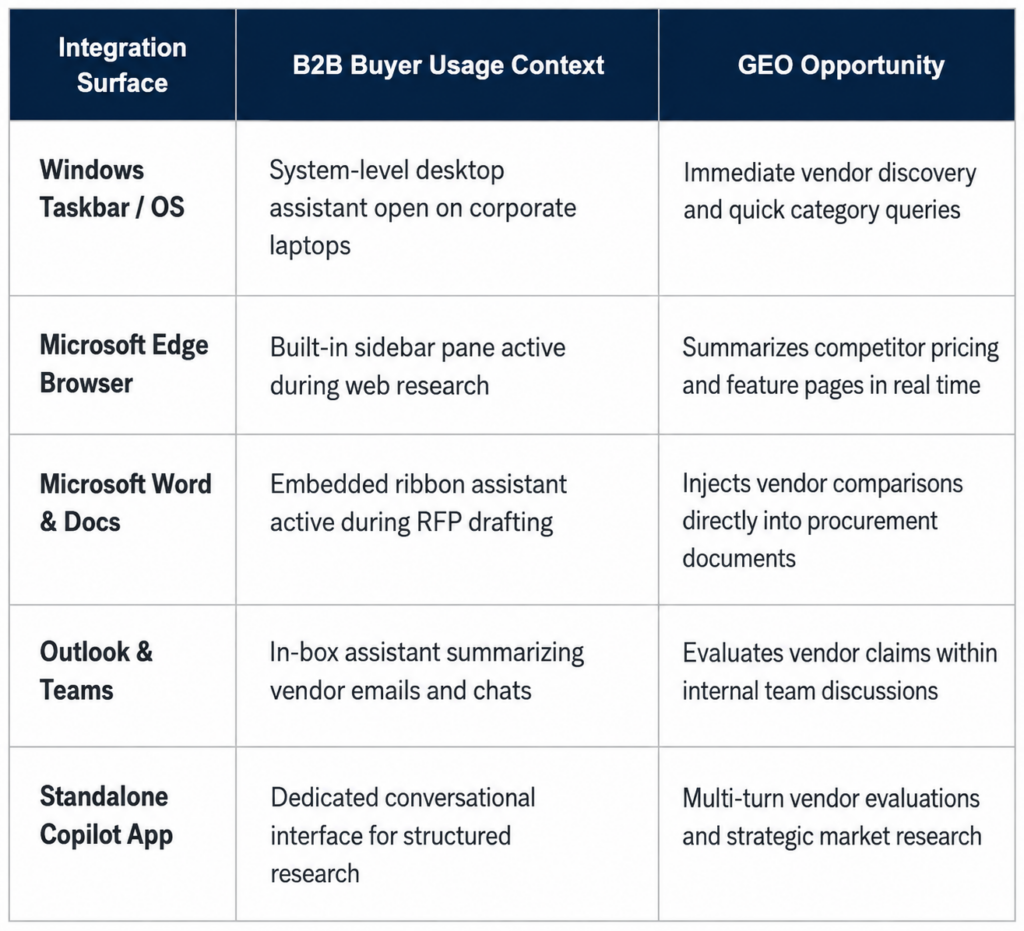
With over 20 million paid enterprise Copilot seats deployed [¹], Copilot captures high-intent B2B research moments directly inside corporate workflows.
How Copilot Sources and Cites Information
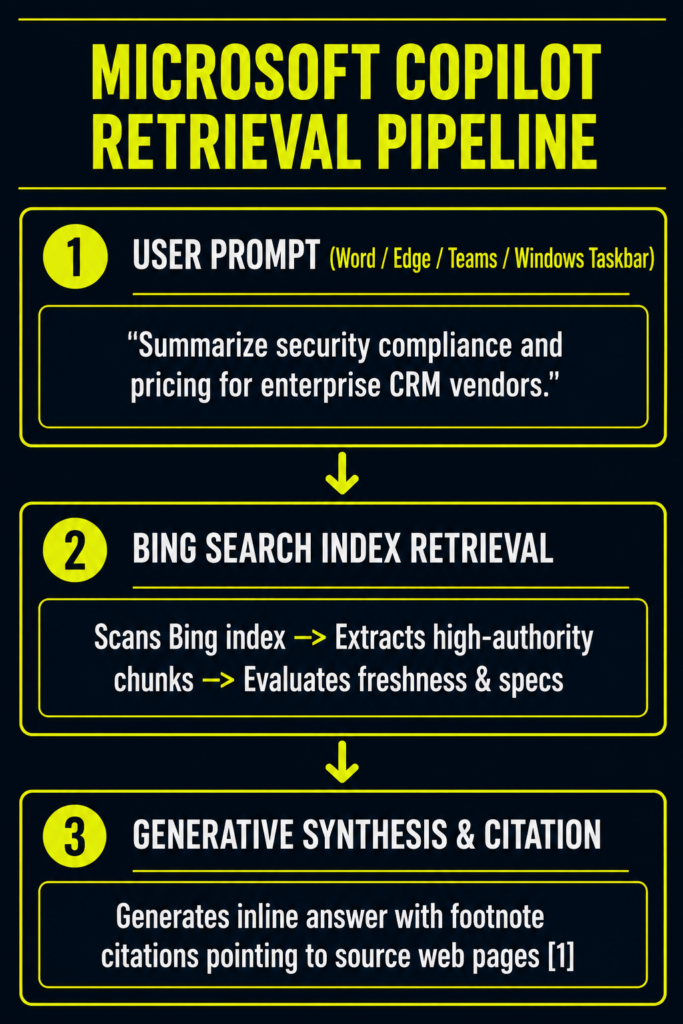
Copilot synthesizes answers by combining three distinct layers:
- Bing’s Web Index: The underlying crawl database containing indexable web pages [¹].
- Real-Time Retrieval: Live web lookups executed for queries requiring current facts, pricing, or product specs [¹].
- Large Language Model Synthesis: Generates natural language responses while attaching footnote-style citation links to retrieved sources [¹].
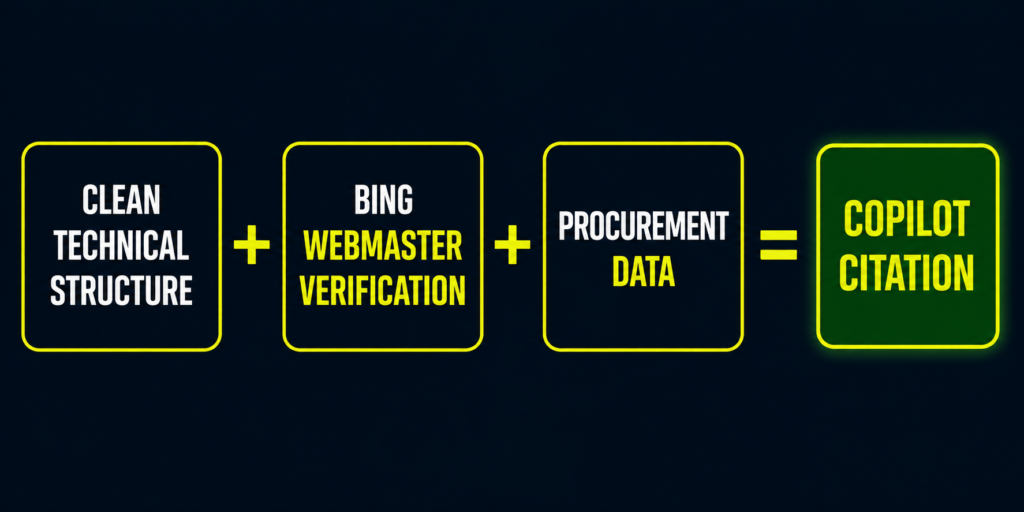
Core Extraction Mechanics:
- Freshness Signals: Copilot favors recently updated pages with clear timestamps, particularly for dynamic business data such as pricing structures, platform integrations, and feature sets [¹].
- Text Extractability: Answers are pulled from concise, standalone paragraphs located near the top of pages. Content buried beneath lengthy introductory text is frequently overlooked [¹].
- Structured Data: Clear headings (H2, H3), HTML comparison tables, bulleted specifications, and schema markup significantly improve machine extraction accuracy [¹].
- Implicit Answer Visibility: Even when Copilot answers a prompt without displaying an explicit footnote link, providing clear content ensures your brand positioning is accurately represented in the synthesized summary [¹].
The B2B Buyer Behavior Shift: Invisible Research Touchpoints
B2B purchasing behaviors have fundamentally changed. B2B buyers frequently rely on AI answer engines during vendor evaluations [²].
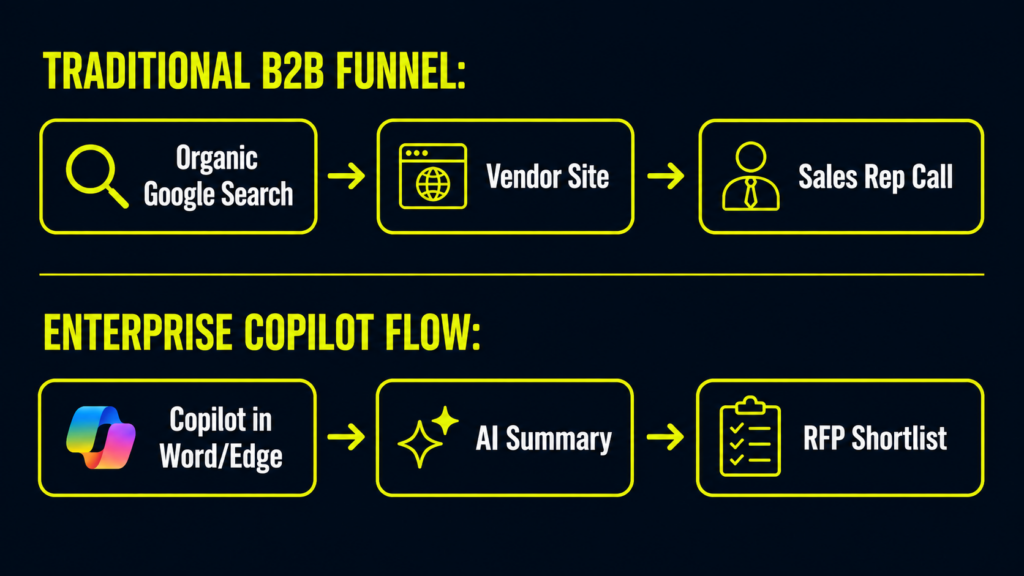
- High AI Utilization: Studies show 94% of B2B buyers use AI at some stage during their purchasing journey, with over half using AI tools to compare vendors directly [²].
- Pre-Sales Rep Discovery: AI answer engines rank as a top research source, evaluating brands long before a buyer contacts a sales representative [²].
- The “Invisible Touchpoint”: Enterprise buyers perform research inside Word, Outlook, or Edge without opening a standard search tab. Optimizing for Copilot ensures your brand is included in these internal evaluation summaries.
For a deeper look at how Copilot compares to other major platforms, read our comprehensive analysis on AI Search Engines Compared.
What Makes Copilot Optimization Different From Generic AI SEO?
While Copilot shares underlying Bing indexing pipelines with ChatGPT’s live search mode, enterprise B2B optimization requires distinct technical and strategic priorities [¹].
Generic AI SEO vs. B2B Copilot GEO
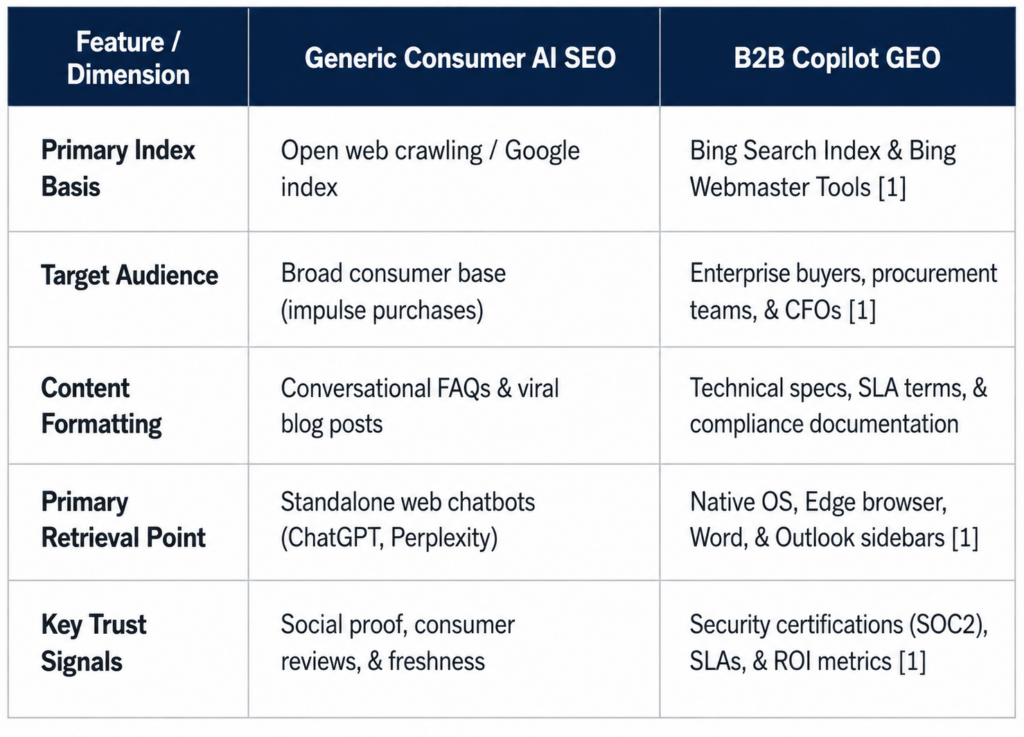
To optimize for Bing-grounded retrieval architectures shared across AI engines, explore The ChatGPT Search Playbook.
4 Mistakes That Destroy Copilot Visibility
- Ignoring Bing Webmaster Tools: Failing to verify your domain in Bing Webmaster Tools isolates your site from the primary index powering Copilot’s retrieval engine [¹].
- Writing Marketing Fluff Instead of Documentation: Using vague claims like “industry-leading platform” provides zero extractable data. Copilot requires specific technical metrics, integration lists, and concrete service-level agreements (SLAs) [¹].
- Omitting Procurement-Stage Content: Focusing exclusively on top-of-funnel blog posts leaves buying committees without the specific pricing, security, and implementation data needed to justify a purchase [¹].
- Neglecting Content Freshness: Allowing integration lists, pricing pages, or compliance documentation to sit untouched for years signals outdated data to Copilot’s retrieval algorithm [¹].
Your 30-Day Copilot Optimization Plan
Follow this 4-week execution pipeline to establish visibility across Microsoft’s enterprise AI ecosystem.
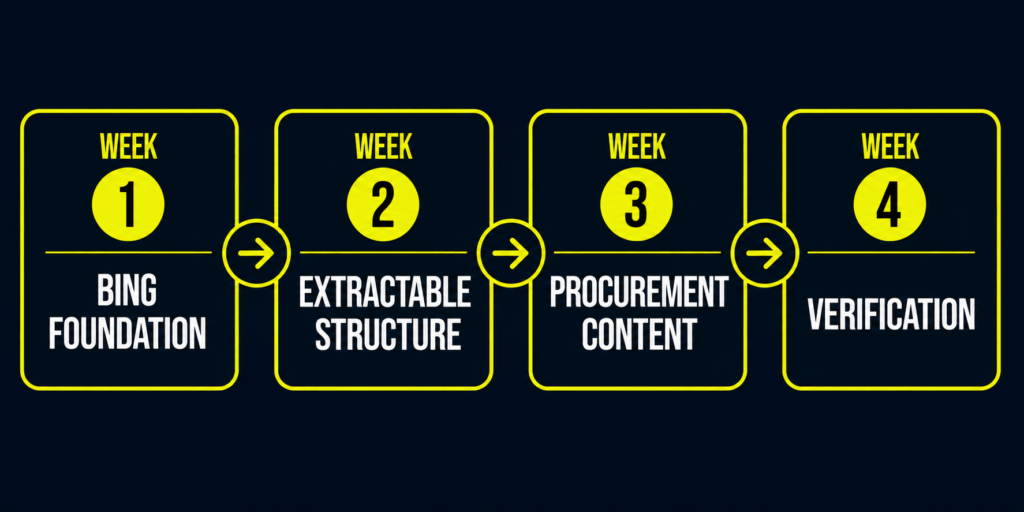
Week 1: Establish Your Bing Technical Foundation
- Claim and verify domain ownership inside Bing Webmaster Tools.
- Submit XML sitemaps and resolve indexation errors across Bing’s crawler network [¹].
- Audit your top 10 commercial pages (pricing, platform comparisons, security documentation) for clear heading hierarchies and direct lead paragraphs [¹].
Week 2: Re-Structure Pages for Machine Extraction
- Rewrite lead paragraphs across key landing pages to provide direct, 2-to-3 sentence summaries of product capabilities.
- Convert unstructured feature descriptions into HTML comparison tables and bulleted specification lists [¹].
- Implement FAQPage and Organization JSON-LD schema markup.
Week 3: Build Procurement-Stage Documentation
- Create dedicated documentation covering enterprise buying criteria: SOC2 compliance, implementation timelines, SLA guarantees, and specific software integrations [¹].
- Refresh all outdated pricing tables, partner integration lists, and case studies with current metric-backed outcomes [¹].
Week 4: Perform Manual Verification & Workflow Integration
- Test real buyer prompts directly inside Copilot (via standalone app, Edge sidebar, or Word) to evaluate brand inclusion and footnote citations [¹].
- Document where competitors appear and identify missing technical specifications in your content [¹].
- Integrate Copilot visibility tracking into your broader search strategy. Learn how to track performance in our guide on Tracking AI Search Visibility Across Platforms.
Partner with National Positions for Enterprise GEO
Establishing clear brand visibility across Microsoft Copilot, ChatGPT, Perplexity, and Google AI Overviews requires dedicated data engineering, Bing index optimization, and procurement-grade content structure.
National Positions provides complete Generative Engine Optimization solutions:
- 22+ Years of Growth Engineering: Managing digital search and performance analytics for over 300 e-commerce and B2B brands.
- Google Premier Partner Leadership: Recognized in the top tier of performance marketing agencies globally.
- The PACE Framework: Our methodology (Plan, Analyze, Convert, Expand) anchors AI search optimization in verifiable business revenue.
- First-Party Attribution via AdBeacon: Our proprietary first-party attribution platform, AdBeacon, measures traffic, attribution, and conversion impact across paid, organic, and AI-driven channels.
If your team needs a partner to execute a complete GEO strategy, explore our specialized AI search optimization work or get in touch with our team directly here.
Frequently Asked Questions
Is Microsoft Copilot the same thing as Bing Chat?
Yes, functionally. Microsoft consolidated Bing Chat into the overarching Copilot brand across Bing, Windows, Edge, and Microsoft 365 [¹]. Copilot continues to use Bing’s search index for live web retrieval [¹].
Do I need separate optimization strategies for Copilot versus ChatGPT?
They share core technical dependencies because both rely heavily on Bing’s search index for live web lookups [¹]. However, Copilot serves an enterprise workplace audience, meaning technical procurement content, security documentation, and integration specs perform significantly better [¹].
How can I verify whether Copilot is citing my website?
Query Copilot directly (via Edge sidebar, standalone app, or Office applications) using target commercial prompts and inspect the footnote citation links attached to the response [¹].
Why is Bing Webmaster Tools essential for AI search optimization?
Copilot and ChatGPT’s live web search tools draw directly from Bing’s index [¹]. Ensuring clean site indexation in Bing Webmaster Tools is mandatory for visibility across these AI answer engines [¹].
Does Copilot GEO benefit e-commerce brands or only B2B companies?
It provides the highest return for B2B contracts, SaaS platforms, and premium e-commerce products with longer consideration windows where research occurs during business hours on corporate hardware [¹].
What is the most immediate step to improve Copilot visibility?
Verify domain ownership in Bing Webmaster Tools and ensure XML sitemaps are actively indexed [¹]. This provides the foundation for all subsequent content and extraction optimizations [¹].
Sources & References
- Microsoft Enterprise & Developer Disclosures, “Copilot Integration Across Microsoft 365, Windows, and Bing Index Retrieval Architecture,” Microsoft Technical Disclosures (2025–2026) [¹].
- Allied Insight, “The B2B Buyer’s Journey Survey: AI Integration in Enterprise Procurement,” B2B Purchasing Benchmark Report (2026) [²].